A password is required for the next level. vortex5.c and md5.h. a-z,A-Z,0-9 is the search space. The password length is 5 chars long, it was originally 7 chars long.
Solution
this level is all about brute forcing, we will run through a list of words or generate the possible permutations with 5 characters of the 0-9,a-z,A-Z character search space.
for this i will use which is an open source password auditing and password recovery tool.
basically john the ripper will try to MD5 hash the passwords or wordsand compare the resulted hash values with the list of hashes given.
in the main function we can see that the hash of the accepted password is
This is the common format string bug, exploit it with care though as a check is made with argc. What is the layout of a process’s memory? How are programs executed?.
Solution
in this level we exploit a format string vulnerability to gain access to next level’s password, the vulnerability resides in passing a user supplied/controlled input (in this case a program argument) to the printf() function.
but as we can see the program exits immediately if at least one program argument was supplied, so how can we overcome this obstacle and leverage the vulnerability to dump the vortex5 user’s password ?!.
the way to overcome this, is to know how the kernel setups the stack layout for the process when it’s first created (there is a lot of blogs/books/papers that explains this in detail so i will not cover it here instead i will just give the initial stack layout up until the moment of main()’s invocation from the startup code).
+++++
local variables of main
saved registers of main
return address of main
argc
argv
envp
+++++
stack from startup code
argc
argv pointers
NULL that ends argv[]
environment pointers
NULL that ends envp[]
ELF Auxiliary Table
+++++
argv strings
environment strings
program name
NULL
the thing we need to know that if a program was created without arguments vector then the first entry in the argv pointers vector will have NULL, now the trick is that we can overlap the evnironment pointers and the argv pointers vectors !.
This level is pretty straight forward. Just sit down and understand what the code is doing. Your shellcode will require a setuid(LEVEL4_UID) since bash drops effective privileges. You could alternatively write a quick setuid(geteuid()) wrapper around bash.
NOTE: ctors/dtors might no longer be writable, although this level is compiled with -Wl,-z,norelro. Lookup some information about this e.g. here
Solution
this level is all about how program’s flow can be changed by modifying the entries of the global offset table structure for ELF binaries.
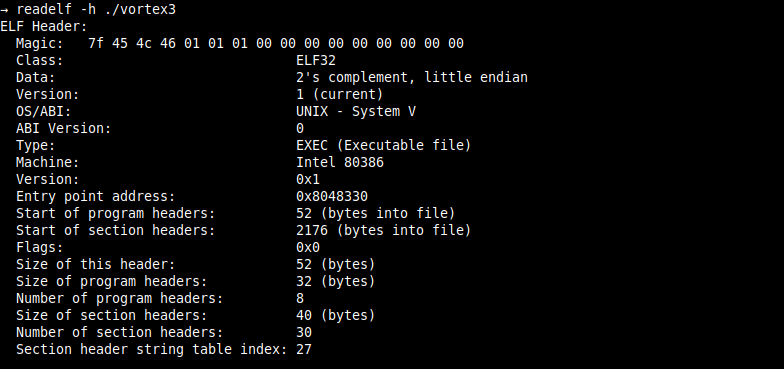
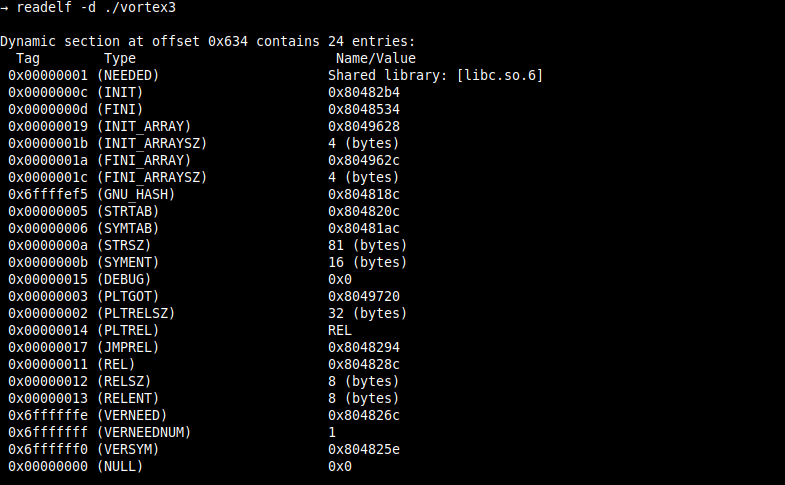
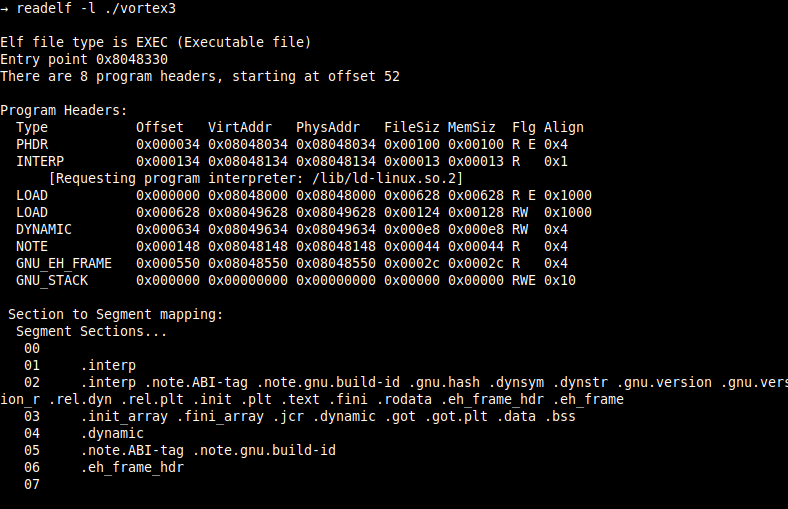
first i start with basic static analysis for the ELF binary
so using basic static analysis we know the following about the vulnerable ELF binary
it’s a dynamically linked executable (there exist a DYNAMIC program header) and the type of this ELF is ET_EXEC (in turn it’s not a PIE ELF binary)
compiled without full or partial RELRO (thers is no GNU_RELRO program header and BIND_NOW FLAG is not set)
stack canary protection is not applied
the stack is marked as executable
this a dynamically linked executable that is compiled with lazy binding which means that the dynamic linker will not link the calls to external (library) functions until the first time the function is being called this all done with the help of the PLT and GOT sections.
We are looking for a specific value in ptr. You may need to consider how bash handles EOF..
Solution
the macro function e() will reward us with a shell if we managed to overwrite the highest byte of the address that the pointer (ptr) points, with the value (0xca)
after disassembling the binary, i can draw the layout of the local variables in the stack.
(high stack addresses)
^ ++++++++++++++++++++++++++++ --> buf_end
|
| /* 256 bytes */
| ++++++++++++++++++++++++++++ --> buf_middle (ptr is initialized to point to this address)
|
| /* 256 bytes */
|
| ++++++++++++++++++++++++++++ --> buf_start
|
| /* 4 bytes */
|
| ++++++++++++++++++++++++++++ --> x (start address of the local variable x)
| /* ptr_byte3 */
| /* ptr_byte2 */
| /* ptr_byte1 */
| /* ptr_byte0 */
| ++++++++++++++++++++++++++++ --> ptr (start address of the pointer ptr)
(low stack addresses)
the program takes one character at a time through the standard input and checks that character against specific values.
Your goal is to connect to port 5842 on vortex.labs.overthewire.org and read in 4 unsigned integers in host byte order. Add these integers together and send back the results to get a username and password for vortex1. This information can be used to log in using SSH.
Note: vortex is on an 32bit x86 machine (meaning, a little endian architecture)
Solution
this level is straightforward and i will just provide the script i wrote for solving it, the should be is self-explanatory.
After all this git stuff its time for another escape. Good luck!
Solution
after logging into the remote server as user bandit32 i was presented with a shell that converts everything i type to uppercase then try to execute it by sh(1).
There is a git repository at ssh://bandit31-git@localhost/home/bandit31-git/repo. The password for the user bandit31-git is the same as for the user bandit31.
Clone the repository and find the password for the next level.
Solution
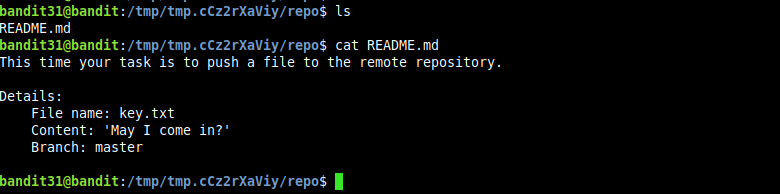
as with the previous overthewire’s bandit git related challenges, i start by cat(1)ing the README.md file.
we can see from the output that we are required to add a new file with a specific name and content, the remote server seems to have a pre-receive hook to validate the file and prevent adding the commit to the remote repository if the conditions are not met.
There is a git repository at ssh://bandit30-git@localhost/home/bandit30-git/repo. The password for the user bandit30-git is the same as for the user bandit30.
Clone the repository and find the password for the next level.
Solution
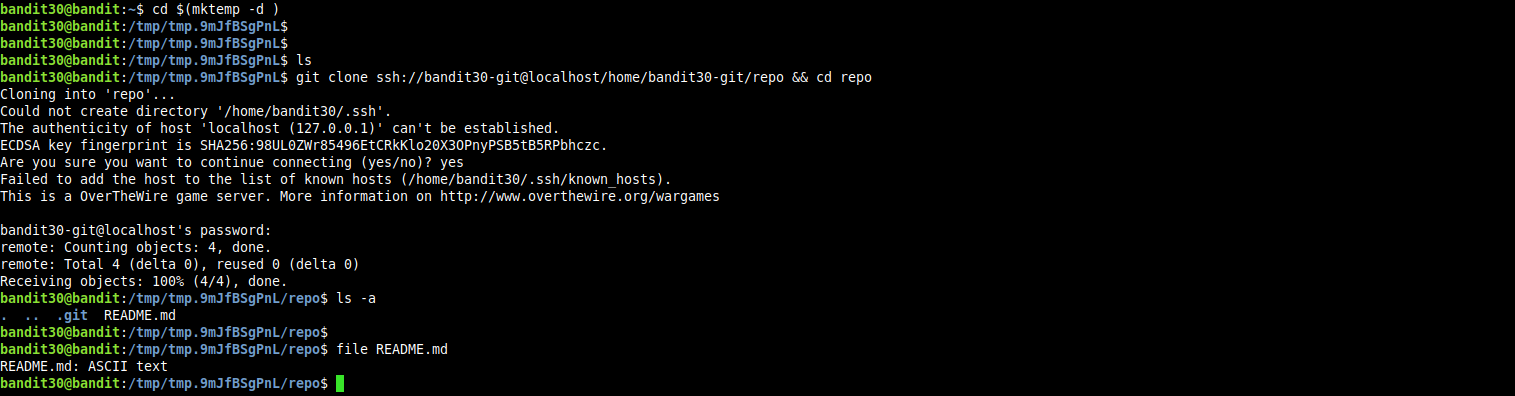
cloning the repo and listing the files in the working directory, i found only one file named README.md which is an ASCII text file.
and there is only one branch in the repo named master.
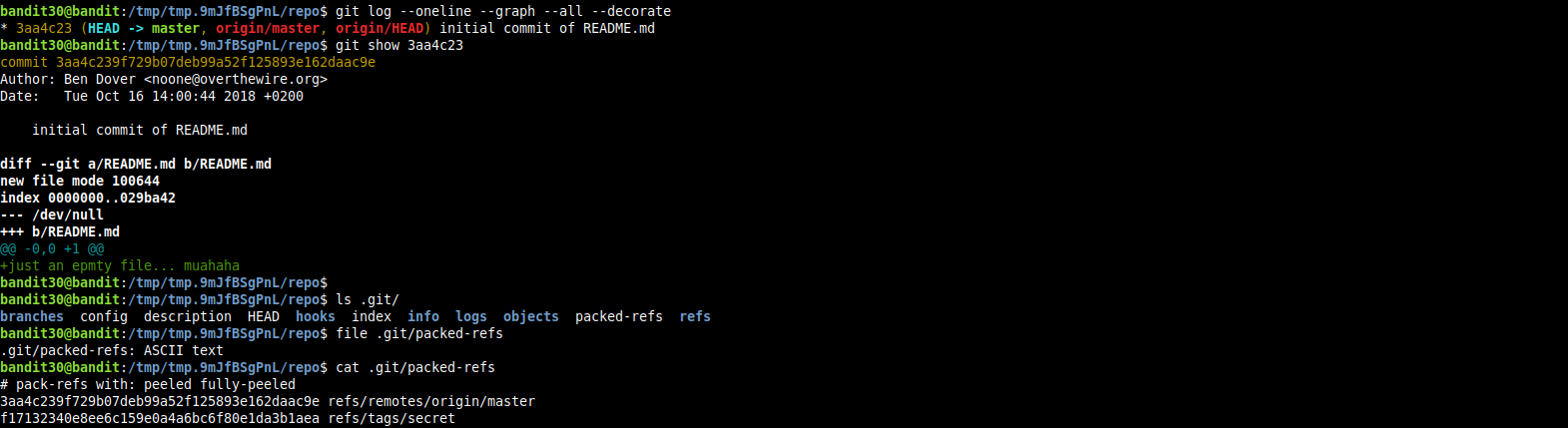
tried listing the commit history, but found only one commit that contains a snapshot for the file named README.md in which a dummy message has been written to this file.
so at the end, i tried looking around in the .git directory hoping to find anything of interest.
There is a git repository at ssh://bandit29-git@localhost/home/bandit29-git/repo. The password for the user bandit29-git is the same as for the user bandit29. Clone the repository and find the password for the next level.
Solution
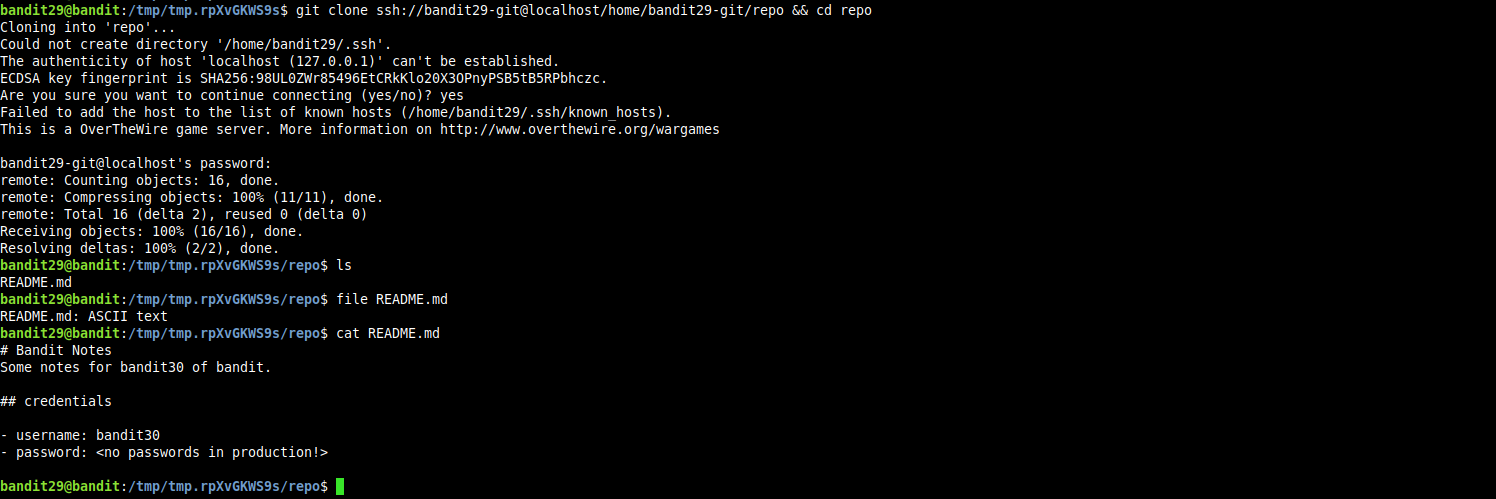
cloning the repo and listing the files in the working directory we find a file named README.md which is an ASCII text file.
hmm, no passwords in production!, by initution there must be a development branch that contain a version of this file with the information needed for the developemnt environment, but let’s get some information about the branches in this repo.