overthewire.bandit.lvl[12-13]
Level Goal
The password for the next level is stored in the file data.txt which is the hexdump of a file that hash been repeatedly compressed. For this level it may be useful to create a directory under /tmp in which you can work using mkdir. For example: mkdir /tmp/myname123. Then copy the datafile using cp, and renamed it using mv (read the manpages!)
Solution
first we create our playground directory and make it our CWD
1 | cd $(mktemp -d) |
now we convert the hexdump into the original binary that was hexdumped.
1 | xxd -r data.txt data.bin |
checking the file format for the generated binary we find that it has been compressed with gzip.
there is 2 methods for decompressing this file (we will stick to the second method for the rest of the writeup).
1 | # method_1 |
either ways the generated binary file will be named data.bin. lets get some information about it
well, it’s a bzip2 compressed binary. now decompressing it and getting info about the
generated binary we find that it’s a gzip compressed binary
decompressing the generated binary and getting info about it. we find it’s a POSIX tar archive
we continue the process of decompressing and getting info about generated binaries until we are presented with an ASCII text file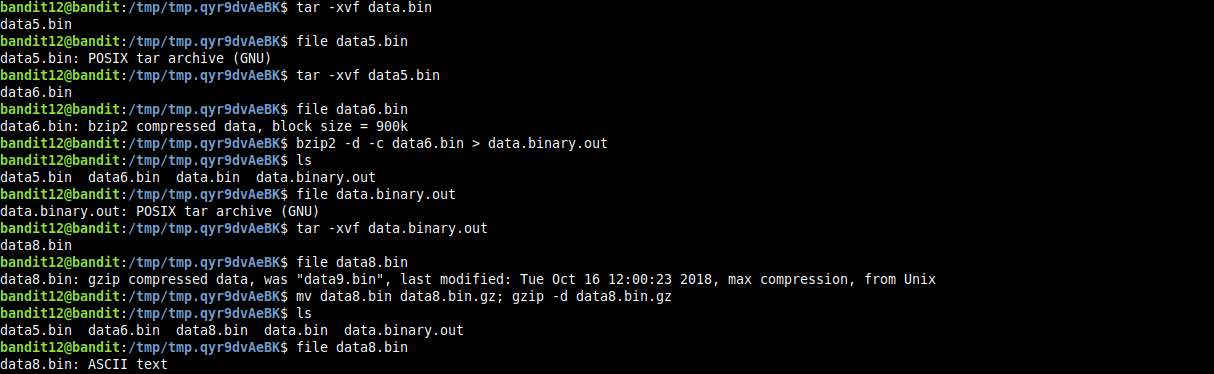
and, finally we got the password for user bandit13