overthewire.bandit.lvl[23-24]
Level goal
a program is running automatically at regular intervals from cron, the time-based job scheduler. look in /etc/cron.d/ for the configuration and see what command is being executed.
NOTE: this level requires you to create your own first shell-script. this is a very big step and you should be proud of yourself when you beat this level!.
NOTE2: keep in mind that your shell script is removed once executed, so you may want to keep acopy around…
Solution
first we ls(1) the directory /etc/cron.d/.

as we can see the file cronjob_bandit24 is readable by any user, let’s see it’s contents.

what looks interesting here is the cronjob that executes the shell script /usr/bin/cronjob_bandit24.sh every minute. let’s cat(1) this file.
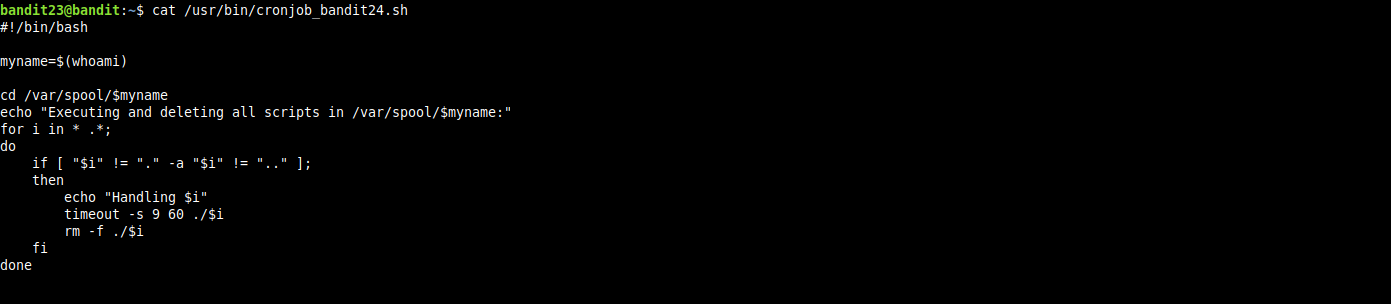
so this shell script will try to execute every file in the /var/spool/bandit24/ directory then remove it, keep in mind that this shell script will run as user bandit24 so the whoami command will evaluate to the value bandit24.
looking at permissions of the directory /var/spool/bandit24/, we find it’s writeable by any user so we can create a shell script, move it there and it will be executed.

now we create our shell script that will cat(1) dump the password of next level to the file /var/spool/bandit24/bandit24.pass, move it to the target directory and sleep for 65 seconds, then dump the contents of the newly created file that contains the next level’s password and we are done!.

